Apple repair Düsseldorf
Face ID

Does Face ID keep working after a screen replacement?

This is the question we hear most often about iPhones. The answer is pleasantly clear, and so is the reason why cheap repairs fail here.

Published Topic Repair

Does Face ID keep working after a screen replacement?

The short answer

Yes. Face ID keeps working after a screen replacement if the parts responsible for it are moved from your device into the new display.

This is exactly where many very cheap repairs fail. If someone simply fits a complete replacement display without transferring your own sensors, Face ID is gone for good afterwards.

What Face ID actually is, technically

Face ID does not work with a normal photo but with a pattern of infrared dots. A projector casts this pattern onto your face, an infrared camera reads it back, and from that a depth image is created.

These parts sit at the top of the display frame, in the notch or, on newer models, in the Dynamic Island. They are paired with your device's logic board, and for good reason: otherwise someone could swap out the face recognition with other hardware.

What we transfer during the replacement

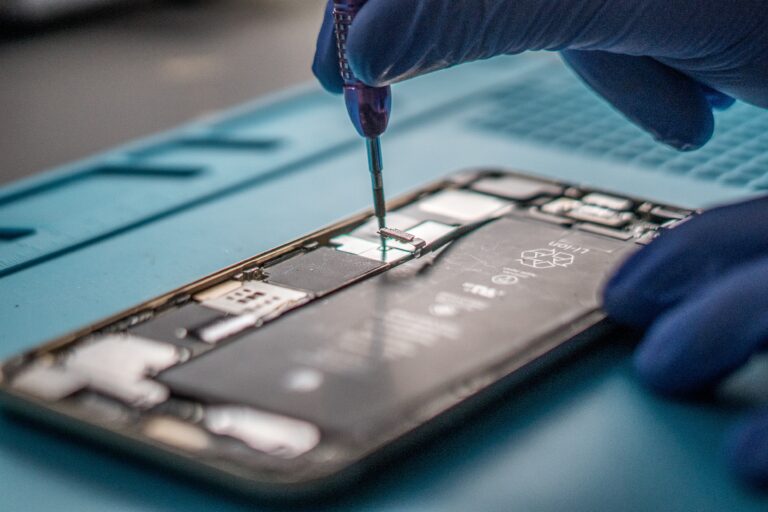
The earpiece, the ambient light sensor and the Face ID sensor strip move from your old display into the new one. This is the part of the job that takes time and decides whether the repair succeeds.

Afterwards we test Face ID with a freshly set up face before you get the device back. If it does not work, we tell you, rather than you telling us the next day.

What cannot be saved

If the sensor strip itself was damaged in the fall, Face ID cannot be restored. Nobody can do that, not even Apple. In that case Apple replaces the whole device.

You can usually tell because Face ID had already stopped working before the repair, or an error message appeared. We check this beforehand and tell you before you agree to a repair.

Apart from that, the device keeps working normally in this case. You unlock it with your passcode, and you can confirm Apple Pay with your passcode as well.

What changed with iOS 15.2

Shortly after the iPhone 13 came out, there was a real problem: after a screen replacement outside the manufacturer's network, Face ID switched itself off, even when all parts from the old display had been transferred.

Apple changed this with iOS 15.2. Since then, Face ID keeps working after a screen replacement. Some older posts online still describe the old situation, which is out of date.

For all earlier models, from the iPhone X to the iPhone 12, this restriction never applied anyway.

Touch ID works on the same principle

On models with a home button, the fingerprint sensor is just as firmly paired with the logic board. That is why we always put your original home button back in.

If the button itself is destroyed, Touch ID will no longer work afterwards. A different button can be pressed but cannot read a fingerprint. Again, this is not down to the repair but to the security architecture.

On Samsung, from the Galaxy S10 onwards, the sensor sits under the display and is replaced along with it. You then register your fingerprints again once, which takes a minute.

Frequently asked questions

Quick answers

Do I have to set up Face ID again after the repair?

Usually not, your saved face stays. For the test we add an extra face and delete it again afterwards. If you feel after the repair that recognition has got worse, set up Face ID again once. That usually fixes it.

Why is Face ID switched off after some repairs?

Because transferring the sensor strip takes work and experience. If only a complete replacement display is fitted, it is faster and cheaper, at the cost of a feature you then lose for good. If in doubt, ask beforehand how the work will be done.

Does Apple Pay still work without Face ID?

Yes. You then confirm the payment with your device passcode instead of your face. That is one extra step at the till, but it works reliably. The same goes for unlocking and for App Store purchases.

Your question isn't here? Call us on 0211 26134549 or send us a repair request.

Request

Get your device checked now

Tell us which device it is and what is wrong with it. We get back to you with the price and how long it takes.

  • No obligation: a request is not an order
  • Free diagnosis and quote
  • A phone number or email is all we need
Prefer to call?0211 26134549
Request a repairStep 1 of 5

What brand is your device?

Four short questions. Then we get back to you with the price and how long it takes.

Have your device looked at now

Tell us what's not working, and we'll have the right part ready. We look at your device for free and give you a quote. Then you decide in your own time whether we repair it.

4.8 out of 5742 reviews on Google
WhatsApp